SpatialData storage format#
SpatialData (Marconato et al., 2025) is a data model for spatially resolved, multimodal datasets. It brings together images, segmentation masks, geometric objects, point clouds, and measurement tables, and relates them in two distinct ways: spatially, through coordinate systems and transformations that express the locations of spatial elements in common coordinates, and by annotation, through tables whose observations reference instances of spatial elements.
This page specifies the storage format: how a dataset of the abstract data model is serialized. Each section repeats a part of the data model, in plain language, and then specifies how it is stored; both parts are normative.
The storage format stores one spatial omics dataset as a Zarr hierarchy with embedded Parquet files. It reuses OME-NGFF for raster data and for coordinate transformations, GeoParquet for shapes, Parquet for points, and the AnnData on-disk format for tables. This specification defines only what those standards leave open and where SpatialData deviates from them.
This is version 0.1 of the storage format. It encodes version 1.0 of the abstract data model. Its stores are Zarr v2 hierarchies of container format 0.1, which they do not record, and hold raster 0.1, shapes 0.1, points 0.1 and tables 0.1 elements; raster elements follow OME-Zarr (NGFF) 0.4, written as "0.4".
Reading this specification#
The key words MUST, MUST NOT, SHOULD, SHOULD NOT and MAY are to be interpreted as described in RFC 2119. Key words have this meaning only in capitals (RFC 8174).
The parts taken from the data model are normative: their definitions and constraints apply to all stores and implementations. They favour readability and use key words only where that makes a constraint clearer. The storage format parts add the requirements for encoding them.
Boxes labelled Implementation note are not normative; they help with understanding and implementing. Boxes labelled Divergence from NGFF flag places where a valid SpatialData store is not a valid NGFF store.
“Attributes” of a Zarr group means the content of its
.zattrsfile.JSON examples are abbreviated where marked with
....
Datasets and elements#
A SpatialData dataset is a collection of named elements of five types: images, labels, points, shapes, and tables. It may contain any number of elements of each type, including none. Element names must be unique within a dataset, even across different element types.
Elements may exist independently of each other, with their own coordinate systems and without annotations.
A dataset may also contain user-defined metadata.
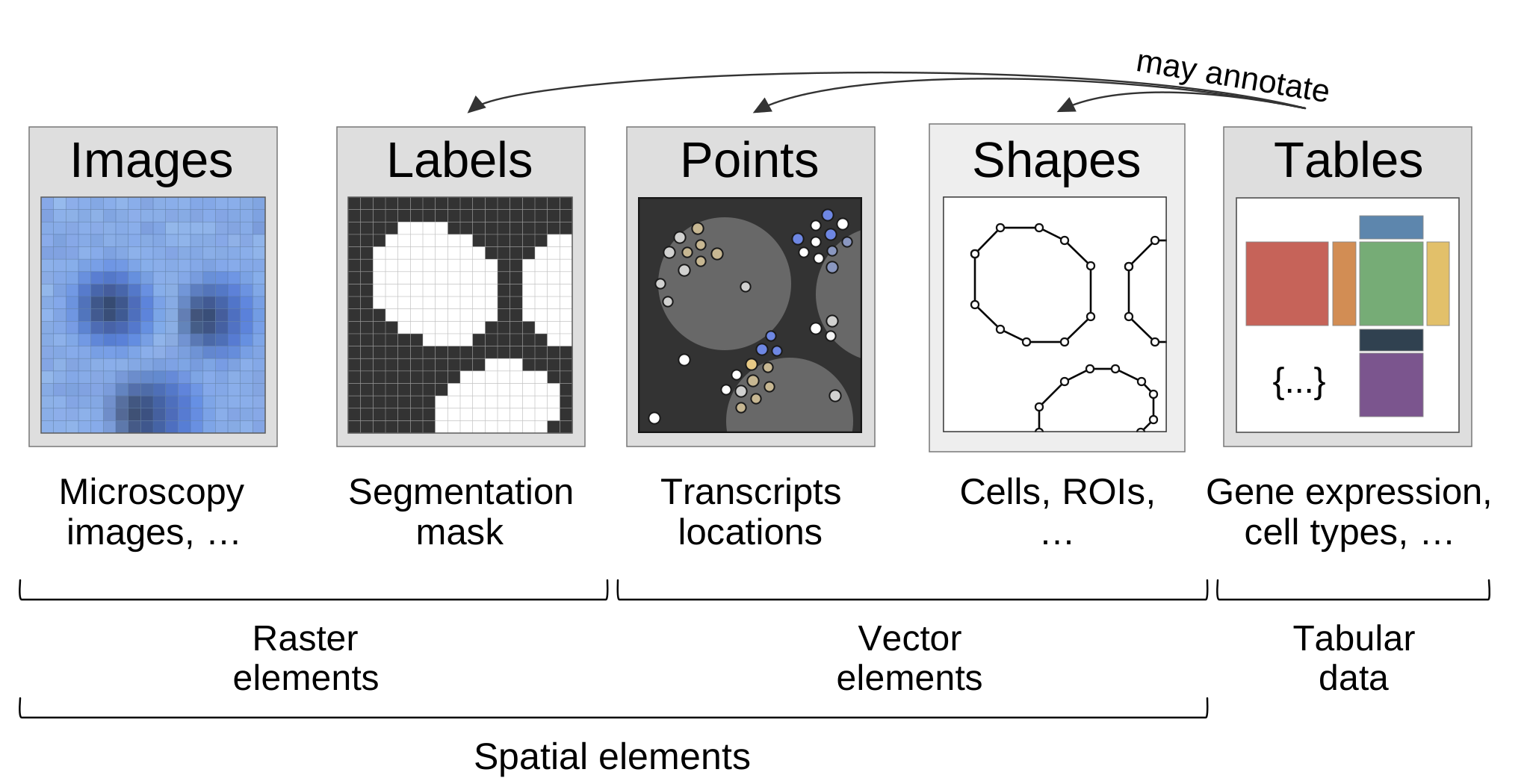
The five element types. Tables annotate instances of labels, points and shapes.#
Layout#
dataset.zarr/                       Zarr v2 group, without SpatialData attributes
├── .zgroup
├── .zmetadata                      consolidated metadata
├── images/
│   └── <name>/                     NGFF multiscale image, axes cyx or czyx
│       ├── .zattrs                 multiscales, omero.channels or channels_metadata
│       ├── 0/                      full resolution array (name given by datasets[0].path)
│       └── 1/ 2/ ...               optional downsampled levels
├── labels/
│   └── <name>/                     NGFF multiscale image with labels metadata, axes yx or zyx
├── shapes/
│   └── <name>/
│       ├── .zattrs                 encoding-type, axes, coordinateTransformations, spatialdata_attrs
│       ├── coords                  vertex coordinates
│       ├── offset0/ offset1 ...    ragged offsets (polygons, multipolygons)
│       ├── Index                   instance identifiers
│       └── radius                  circles only
├── points/
│   └── <name>/
│       ├── .zattrs                 encoding-type, axes, coordinateTransformations, spatialdata_attrs
│       └── points.parquet/         multi-file Parquet dataset: x, y [, z] [, extra columns]
│           └── part.0.parquet
└── tables/
    └── <name>/                     AnnData Zarr + region; region_key, instance_key name obs columns
Element types#
Type |
Group |
Payload |
Standard reused |
Section |
|---|---|---|---|---|
Image |
|
Zarr arrays |
NGFF multiscales |
|
Labels |
|
Zarr arrays |
NGFF multiscales + NGFF labels ( |
|
Shapes |
|
Zarr arrays (ragged arrays) |
— |
|
Points |
|
|
Parquet |
|
Table |
|
Zarr arrays |
AnnData |
The container is the Zarr hierarchy that holds all elements of one dataset. It fixes where elements live, how they are named, and how a reader discovers the format version of the store and of each element.
Root group#
The root of a store MUST be a Zarr v2 group. It carries no SpatialData attributes: there is
no spatialdata_attrs object and no container format version.[1]spatialdata writes the root spatialdata_attrs from release 0.3.0. Readers MUST
treat a store without spatialdata_attrs as container format version "0.1".
Any other root attribute is user metadata. It MUST be JSON-serialisable and is otherwise unconstrained. A tool that reads a store and writes it again (in place or to a new location) MUST keep root attributes it does not recognise, so that user metadata is not lost.
Consolidated metadata (.zmetadata in the root group) SHOULD be written so that the store
can be listed with one request on object storage. Readers MUST NOT require it. Some stores
contain zmetadata (without the leading dot) because of a bug in zarr-python’s FSStore
(zarr-python#1121); readers that use
consolidated metadata SHOULD accept both names.
Element type groups#
Elements live in fixed top-level groups named after their element type (see Element types). A group MAY be absent when the dataset has no element of that type; it MAY also be present and empty. Each group MUST be a Zarr group. Readers SHOULD ignore top-level groups and root members with other names.
The labels group is itself an NGFF labels group and carries the list of its children:
// labels/.zattrs
{ "labels": ["blobs_labels", "blobs_multiscale_labels"] }
Writers MUST keep this list in sync with the child groups. Readers SHOULD enumerate the
child groups when the storage system supports listing. Listing is not always available (for example
plain HTTP, or an S3 bucket without list permission); this is why consolidated metadata is written,
and the list in labels is redundant with it. When the store is not listable, readers SHOULD
use the consolidated metadata rather than the list. The other four type groups carry no attributes.
Element groups and names#
Each element is one Zarr group, a direct child of its type group, named with the element name. Element names:
MUST NOT be empty,
., or..;MUST consist only of alphanumeric characters (Unicode letters and digits),
-,_and.; whitespace and/are therefore excluded;MUST NOT start with
__;MUST be unique across all element types, as in the data model, and also when compared case-insensitively, that is after the Unicode default lowercase conversion (toLowercase, Unicode §3.13, including Final_Sigma) of both names:[2]
spatialdatacompares the names after Pythonstr.lower(), which implements this conversion. Simple per-character lowercasing (for example Go’sstrings.ToLower) differs from it, and so does case folding:STRASSEandstraßeare different names.images/Cellsandlabels/cellsMUST NOT coexist. This keeps stores portable to case-insensitive file systems.
The same rules apply to column names of obs and var, and to keys of obsm, obsp, varm,
varp, uns and layers in tables (see Tables).
Stores of this version may contain names that break these rules.[3]spatialdata checks element names from release 0.2.0 (alphanumeric characters,
_ and -) and applies the rules above, including case-insensitive uniqueness, from release
0.3.0. Readers SHOULD
accept them; a writer that adds elements to such a store MUST follow the rules for the new
elements.
Element type and version#
A reader MAY take an element’s type from the name of its parent group, but it SHOULD determine the type and the format version from the element’s own metadata, as listed below (attribute paths are relative to the element group’s attributes):
Element type |
Type marker |
Version location |
Version |
|---|---|---|---|
images |
|
none: raster elements have no |
|
labels |
as images, plus |
none: raster elements have no |
|
shapes |
|
|
|
points |
|
|
|
tables |
|
|
|
Versions#
Readers:
A reader MUST NOT claim to have read an element whose type or version it does not implement. It SHOULD skip such an element, warn, and read the others.
Two container format versions are compatible if they are equal, or if they share the major version and it is not 0. For example,
1.0and1.1are compatible;0.1and0.2are not.A reader that meets a container format version it does not know, but that is compatible with a version it implements, MAY read the elements whose versions it implements, and SHOULD warn. It MUST NOT modify such a store.
A reader MUST NOT read a store whose container format version is incompatible with every version it implements: a reader of another version could misread it.
A reader SHOULD ignore attributes it does not know.
A reader SHOULD read every version of the storage format that encodes the current major version of the data model or the previous one.
Writers:
A writer MUST NOT write a version it does not implement in full.
A writer MUST write released versions by default. It MAY write a draft version when asked to explicitly, and then MUST mark the container format version with a
-devsuffix (for example"0.3-dev"). A version with the suffix is a different version from the one without it.A writer that adds elements to an existing store MUST write them in the element versions of that store, or refuse.
A writer that copies a store MUST keep root attributes it does not know.
Implementation note
By default, spatialdata.read_zarr fails on an element it cannot read, for example a points,
shapes or tables element of an unknown version, instead of skipping it. For images and labels it
checks only the NGFF version, not spatialdata_attrs.version. With on_bad_files="warn" it skips
an element that fails with KeyError, ValueError, OSError, ArrowInvalid, JSONDecodeError
or ArrayNotFoundError, with a warning, and reads the others; other errors still fail the read.
Non-Zarr payloads#
Shapes and points store their data in Parquet files inside their element group
(shapes.parquet, points.parquet/). These are not Zarr nodes. Zarr tooling that lists the
hierarchy may warn about them; readers and validators MUST tolerate their presence and
MUST NOT treat them as Zarr arrays or groups.
Implementation note
To read a store from scratch: open the root group, read spatialdata_attrs.version if present, then for each
of the five type groups that exist, iterate over child groups (skipping hidden entries such as
.zgroup and .zmetadata in Zarr v2), and dispatch on the metadata of each element (see
“Element type and version”); spatialdata.read_zarr dispatches on the type group name instead. Read each element’s version before parsing its payload.
Divergence from NGFF
NGFF defines no top-level layout for a collection of images, shapes, points and tables. The five
type groups, the spatialdata_attrs object and the encoding-type markers on shapes and points are
SpatialData extensions, and so is storing Parquet files inside a Zarr hierarchy. NGFF plate,
well and bioformats2raw.layout metadata are not used.
Row identifiers#
The Parquet files of points store the row identifiers, the instance identifiers of the data model, in the way pandas does.
A reader finds them in the file’s key-value metadata under the key pandas, a JSON object whose
index_columns is a list:
An entry that is a string is the name of a column of the file. The values of that column are the row identifiers; the column is not data.
An entry that is an object with
"kind": "range"describes identifiers that are not stored: they arestart,start + step,start + 2 × step, … up to but excludingstop, one per row.If the
pandasmetadata is absent orindex_columnsis empty, the row identifiers are the row positions 0, 1, …, n − 1 of the file.
Writers SHOULD NOT write more than one entry in index_columns (a multi-level index): a table
cannot annotate such an element, because its instance column holds integers or strings. Readers
MAY reject such an element.
In a points dataset of several files, each file is decoded on its own, and the row identifiers follow the order of the parts.
Spatial elements#
Four element types represent spatially located data: images, labels, points, and shapes.
The axes are the spatial axes x, y, and optionally z, and the channel axis c. Images and
labels have the spatial axes; images additionally have the channel axis. Points and shapes use
spatial coordinates rather than raster axes.[4]Units are not part of the current model: stores carry a placeholder unit.
Multiscale rasters represent the same spatial data at different resolutions. Their resolution levels belong to a single spatial element.
Axes#
An element’s axes are fixed by its type:
Element |
Axes (in storage order) |
|---|---|
images |
|
labels |
|
shapes |
|
points |
|
Shapes are 2D: their geometries have x and y coordinates only.
Only these four axis names exist. c has NGFF type channel; x, y, z have type space. No
other axis names or types (such as time) are allowed. Coordinates
along x, y, z are real numbers. Within one named coordinate system, the coordinates of all
elements along an axis are directly comparable, as if in one unit; the stored unit strings are
informational (Encoding).
Divergence from NGFF
NGFF allows other axes, such as time, and custom axis types. SpatialData does not support them, so a valid NGFF image with such axes is not a valid SpatialData raster element.
For raster elements, the storage format does not fix whether the integer coordinate i is the
centre or the corner of pixel i.[5]spatialdata 0.8 is not consistent here, a known bug
(scverse/spatialdata#165). These operations
treat pixel i as covering [i, i + 1], with its corner at i: the coordinates spatialdata
attaches to raster arrays (i + 0.5, consistently for coarser levels), get_extent (0 to the
shape), get_centroids and to_circles of labels, and rasterize of points and shapes,
including the transformation it gives its result. rasterize of images and labels adds
half-pixel offsets to the transformation of its result but not to its resampling. These treat
pixel i as covering [i − 0.5, i + 0.5], with its centre at i (the NGFF convention):
to_polygons of labels, and the resampling in spatialdata.transform of raster elements, whose
result grid nevertheless starts at 0. Positions derived from one raster element can therefore
differ by half a pixel between operations: for a label of one pixel at (0, 0), get_centroids
gives (0.5, 0.5) and to_polygons a diamond centred at (0, 0). Until the convention is
fixed, alignment between a raster element and other elements is defined only to within half a
pixel of the raster element. Shapes and points store coordinates directly.
Images#
Images are two- or three-dimensional raster arrays of measurements, with one or more channels. They may have multiple resolution levels (multiscale images).
raster 0.1 Zarr v2
An image element is an NGFF 0.4 multiscale image
stored in images/<name>, with the axis restrictions and additional attributes listed here.
Everything not mentioned (array layout, chunking, codecs, pyramid construction) is governed by
NGFF 0.4 and Zarr.
Layout#
images/<name>/
├── .zattrs            multiscales, omero, spatialdata_attrs
├── 0/                 level 0: full resolution, shape (c, y, x) or (c, z, y, x)
└── 1/                 optional coarser levels ...
Names. Each level’s array is found through
multiscales[0].datasets[*].path. As in NGFF,pathis any string giving the array’s location relative to the image group; the names carry no meaning. Readers MUST resolve arrays throughpathand MUST NOT assume a naming scheme.Order. Levels are ordered by their position in
datasets, from the highest resolution to the lowest, as NGFF requires; the resolution of each level is given by itsscale(seedatasetsbelow).
Implementation note
Stores of this version name the levels 0, 1, ….[6]spatialdata writes raster elements with ome-zarr-py, which names levels 0, 1, …
up to version 0.13 and s0, s1, … from version 0.14
(ome-zarr-py#544). spatialdata up to 0.5
requires zarr-python 2 and therefore ome-zarr-py 0.11 or earlier; from 0.6 it requires only a
minimum ome-zarr-py version, so the names depend on the ome-zarr-py installed when the store
was written.
Attributes#
The examples below show the same image my_image (two channels, two levels);
multiscales[0].coordinateTransformations is specified in Coordinate systems and transformations
and elided here.
Raster format 0.1, in images/<name>/.zattrs:
{
  "multiscales": [
    {
      "datasets": [
        {
          "path": "0",
          "coordinateTransformations": [
            { "type": "scale", "scale": [1.0, 1.0, 1.0] }
          ]
        },
        {
          "path": "1",
          "coordinateTransformations": [
            { "type": "scale", "scale": [1.0, 2.0, 2.0] }
          ]
        }
      ],
      "name": "/images/my_image",
      "axes": [
        { "name": "c", "type": "channel" },
        { "name": "y", "type": "space" },
        { "name": "x", "type": "space" }
      ],
      "version": "0.4",
      "coordinateTransformations": [ ... ]
    }
  ],
  "omero": {
    "channels": [
      { "label": "DAPI" },
      { "label": "CD3" }
    ]
  }
}
Some stores of this version hold the channel names in a channels_metadata key, with the same
content as omero, instead of omero.[7]spatialdata up to 0.1.2 writes channels_metadata; from 0.2.0 it writes
omero and reads both.
multiscales[0].versionMUST be
"0.4". The metadata does not follow NGFF 0.4 in full: its transformations follow an NGFF draft (see Coordinate systems and transformations).multiscalesMUST contain exactly one entry.
multiscales[0].axesMUST be exactly
c, y, xorc, z, y, xwith typeschannel,space,space(,space). Axes carry nounithere; units live in the coordinate system objects of the transformations.multiscales[0].datasetsOne entry per pyramid level, ordered from full resolution to coarsest.
pathMUST be the name of the child array. Each entry MUST contain acoordinateTransformationslist with exactly one entry, ascalewith the ratio between the level-0 shape and this level’s shape (1.0forc). Single-scale images have one dataset.multiscales[0].coordinateTransformationsMUST be present with at least one entry, as specified in Coordinate systems and transformations. Maps level-0 pixel space to named coordinate systems.
multiscales[0].nameMAY be present. Informational; readers MUST NOT interpret it.[8]
spatialdatawrites the group path (for example"/images/my_image") for multiscale images. For single-scale images it leaves the name to ome-zarr-py, which writes"image"from version 0.18 (ome-zarr-py#515) and the group path before.omero.channelsorchannels_metadata.channelsOne of the two SHOULD be present with one object per
cindex, in order.labelis the channel name and MAY be a string or a number. Readers MUST accept both keys and SHOULD preferomerowhen both are present; they SHOULD fall back to0 … n-1when neither is. Otheromerofields defined by NGFF (window,color,rdefs, …) MAY be present and are not interpreted by SpatialData.spatialdata_attrsNot present: raster elements of this version carry no SpatialData attributes. The raster version, 0.1, follows from
multiscales[0].versionbeing"0.4".
Arrays#
Level
0MUST hold the full-resolution data. Every level MUST have the same number of dimensions, in the axes order above.Any numeric Zarr data type is allowed.
Chunk shape and codecs are free. Writers SHOULD keep chunks well below 2 GiB.
Three- or four-channel images whose channel labels are
r, g, b(, a) MAY be rendered as RGB(A) by viewers; this is a convention, not a requirement.
Implementation note
A minimal reader needs axes, datasets[*].path, the per-level scale in
datasets[*].coordinateTransformations, coordinateTransformations, and omero.channels[*].label. Everything else in the group can be
ignored. To read only a region at a given resolution, pick the coarsest level whose scale meets the
requested resolution and compose its per-level scale with the element transformation.
Divergence from NGFF
Relative to NGFF 0.4: the version string claims NGFF 0.4, but
multiscales[0].coordinateTransformations uses the RFC-5-style encoding with named output
coordinate systems rather than the scale/translation-only form of NGFF 0.4, so a conforming
NGFF 0.4 reader may reject the metadata or misread the transformations; axes are restricted to
c(z)yx and time is not allowed. The arrays and per-level scales are valid NGFF 0.4.
Labels#
Labels are two- or three-dimensional integer-valued raster arrays identifying spatial regions. Pixels with the same nonzero value belong to the same instance; zero represents the background. Labels may also be multiscale.
raster 0.1 Zarr v2
A labels element is stored in labels/<name> as an NGFF 0.4 multiscale image with
image-label metadata.
Everything in Images applies, with the following differences.
Attributes#
Raster format 0.1, in labels/<name>/.zattrs:
{
  "multiscales": [{ "version": "0.4", "name": "blobs_labels", "axes": [ ... ], "datasets": [ ... ], "coordinateTransformations": [ ... ] }],
  "image-label": { "version": "0.4" }
}
multiscales[0].axesMUST be exactly
y, xorz, y, x, all of typespace. There is no channel axis.image-labelMUST be present.
versionSHOULD be"0.4". The NGFFcolors,propertiesandsourcefields MAY be present; SpatialData does not write or interpret them. Some multiscale labels lack this key;[9]For example multiscale labels written byspatialdata0.6. readers SHOULD tolerate its absence.omeroMUST NOT be present.
The parent labels group lists the element in its labels attribute (Element type groups).
Arrays#
The data type MUST be an integer type (signed or unsigned) or boolean (
False= 0,True= 1).The array values are the instance identifiers of the data model. Readers MUST NOT treat the background value
0as an instance.Downsampled levels SHOULD be produced without interpolation (nearest neighbour or majority), so that no new label values appear.
Implementation note
To join a labels element with a table: read instance_key from the table, then match the integer
values of the label array against the table’s obs[instance_key] column for rows whose
obs[region_key] equals this element’s name. See Tables.
Negative values are instances (see above). spatialdata reads and writes them, and get_centroids
returns them, but to_polygons drops them (and fails if no value is positive) and to_circles
fails on them.
Points#
Points are collections of two- or three-dimensional locations, optionally associated with per-point values such as gene identity or intensity.
points 0.1 Zarr v2
A points element is stored in points/<name> as a Zarr group whose attributes hold the
SpatialData metadata and whose payload is a partitioned Parquet dataset with one row per point.
This layout is designed for large tables (10⁶ to 10⁹ rows) and lazy, partition-wise reading.
Layout#
points/<name>/
├── .zattrs                encoding-type, axes, coordinateTransformations, spatialdata_attrs
└── points.parquet/        Parquet dataset (directory)
    ├── part.0.parquet
    └── part.1.parquet ...
Attributes#
In points/<name>/.zattrs:
{
  "encoding-type": "ngff:points",
  "axes": null,
  "coordinateTransformations": [ { "type": "identity", "input": {...}, "output": { "name": "global", ... } } ],
  "spatialdata_attrs": {
    "version": "0.1",
    "feature_key": "gene",
    "instance_key": "cell"
  }
}
encoding-typeMUST be
"ngff:points".axesMAY be
null;[10]spatialdataup to 0.2.1 writes"axes": nullfor shapes and points: ome-zarr-py drops the axes for the format version"0.1". otherwise it MUST be["x", "y"]or["x", "y", "z"], and MUST match the coordinate columns present in the payload. When it isnull, the axes are the coordinate columns present in the payload, in the orderx,y,z.coordinateTransformationsMUST be present with at least one entry (Coordinate systems and transformations). Input axes are in the order given by
axes.spatialdata_attrs.versionMUST be
"0.1".spatialdata_attrs.feature_keyMAY be present. Name of the column that holds the feature each point measures (e.g. a gene or protein identifier). When present, the column SHOULD exist and SHOULD be dictionary encoded (categorical).
spatialdata_attrs.instance_keyMAY be present. Name of the column that holds the identifier of the instance each point belongs to (e.g. a cell). The format does not define which element those identifiers refer to.
Payload: points.parquet/#
A directory containing one or more Parquet files named part.<i>.parquet, where <i> is a
non-negative decimal integer. Readers MUST concatenate all parts in ascending numeric order of <i>
(part.10.parquet after part.9.parquet). All parts MUST share one schema.
- Coordinate columns
xandyMUST be present;zMUST be present whenaxeslists it. Type MUST beint32,int64,float32orfloat64.- Other columns
MAY be present with any Parquet type. Column names SHOULD follow the naming rules of Element groups and names; the row index column is exempt.[11]
spatialdatachecks the naming rules only for tables, not for the columns of points and shapes. The index columns it writes,__null_dask_index__and__index_level_0__, start with__.- Row index
Writers MUST store the dataframe index as a column referenced from the
pandas.index_columnsschema metadata (see Row identifiers). Its values are the row identifiers, the instance identifiers of the data model; readers MUST use them, not row positions, and MUST NOT treat the column as data. Row identifiers MUST be unique within the element if a table in the store annotates it (names it inregion); otherwise they MAY repeat, and readers MUST NOT assume that they are unique.[12]spatialdataalways stores the index, and names an unnamed index__null_dask_index__. A dataset without it has no usable row identifiers: Parquet readers such as dask number the rows of each part file from 0. A writer MUST NOT write a table that annotates a points element whose identifiers repeat.
Implementation note
points.parquet/ is a standard Hive-less Parquet dataset: pyarrow.parquet.read_table,
arrow::open_dataset in R, dask.dataframe.read_parquet and parquet-wasm all read it directly.
For spatial queries, read the Parquet row-group statistics of x, y (and z) to skip row groups
outside the query box before loading data.
A multi-file Parquet dataset whose files each number their rows from 0, such as Xenium
transcripts, has repeated row identifiers. spatialdata keeps them as they are, and does not check
that the row identifiers of annotated points are unique.
Divergence from NGFF
NGFF has no points type. The group attributes, the ngff:points marker and the Parquet payload are
SpatialData definitions.
Shapes#
Shapes are collections of two-dimensional geometries: within one shapes element, either all
circles, each given by a centre and a positive radius, or all polygons and multipolygons. Each
geometry represents an individually identifiable instance. Geometries MUST be two-dimensional,
with axes x and y.[13]Outlook: z coordinates for shapes are expected to come through an RFC.
shapes 0.1 Zarr v2
A shapes element is stored in shapes/<name> as a Zarr group whose attributes hold the SpatialData
metadata and whose arrays hold the geometries in the ragged-array layout of
shapely, with
one instance per geometry.
Layout#
shapes/<name>/
├── .zattrs           encoding-type, axes, coordinateTransformations, spatialdata_attrs
├── coords            vertex coordinates
├── offset0           offsets (polygons and multipolygons only)
├── offset1 ...
├── Index             instance identifiers
└── radius            circles only
Attributes#
In shapes/<name>/.zattrs:
{
  "encoding-type": "ngff:shapes",
  "axes": null,
  "coordinateTransformations": [ { "type": "identity", "input": {...}, "output": { "name": "global", ... } } ],
  "spatialdata_attrs": { "version": "0.1", "geos": { "name": "POLYGON", "type": 3 } }
}
encoding-typeMUST be
"ngff:shapes".axesMAY be
null;[10]spatialdataup to 0.2.1 writes"axes": nullfor shapes and points: ome-zarr-py drops the axes for the format version"0.1". otherwise it MUST be["x", "y"]. Shapes of this version are 2D: their axes arex, y.coordinateTransformationsMUST be present with at least one entry (Coordinate systems and transformations). Input axes are
x, yin this order.spatialdata_attrs.versionMUST be
"0.1".spatialdata_attrs.geosMUST be present: the geometry type of all rows, with
namethe GEOS geometry type name ("POINT","POLYGON"or"MULTIPOLYGON") andtypeits integer code (0,3or6).
Payload#
The arrays hold the output of shapely.to_ragged_array for the geometries of all rows:
coordsMUST be present: a float array of shape
(n_vertices, 2)with thex, ycoordinates of all vertices (of the centres, for circles).offset0,offset1, …MUST be present for polygons and multipolygons, and MUST NOT be present for circles: the offset arrays of the ragged-array layout, in order (
offset0intocoords, each following one into the previous one): two for polygons, three for multipolygons.IndexMUST be present: one value per row, the instance identifiers of the data model. They MUST be unique and MAY be integers or strings (variable-length UTF-8).
radiusMUST be present for circles (
geos.nameis"POINT"): one numeric value per row. For polygons and multipolygons it MAY be present and has no meaning. A point plus a radius is a circle; the radius is expressed in the same units as the coordinates and is scaled by the coordinate transformation. Writers MUST write finite, strictly positive radii; readers SHOULD warn about values that are not finite rather than reject the element.[14]spatialdatawarns about NaN and positive infinite radii instead of rejecting them. Stores written by the Xenium reader ofspatialdata-ioup to 0.1.3.post0 can hold NaN radii for cells without nuclei (scverse/spatialdata#657).
All rows MUST have the geometry type given by geos. No other columns are stored. The element
MUST contain at least one row.[15]Not a property of the data model: spatialdata infers from the first geometry
whether an element holds circles or polygons and how many axes it has, and an empty file records
neither. Points, labels and tables may be empty. Spatial queries in spatialdata drop elements
that would become empty instead of storing them.
Divergence from NGFF
NGFF has no shapes type. The group attributes, the ngff:shapes marker and the use of GeoParquet are
SpatialData definitions.
Coordinate systems and transformations#
SpatialData relates spatial elements through named coordinate systems, which provide common reference frames for interpreting their locations.
Each spatial element has an intrinsic coordinate system, defined by its spatial axes and coordinates. This coordinate system is specific to the element and may be unnamed.
A spatial element is associated with one or more named coordinate systems through coordinate transformations. Each transformation maps coordinates from the element’s intrinsic coordinate system to a named coordinate system. An element has at most one transformation to each named coordinate system.
Multiple elements may share a named coordinate system; their locations are then expressed in the same coordinates.
An element may be associated with multiple named coordinate systems, representing its location in different reference frames.
Named coordinate systems are identified by their name; they may exist only as a name, without a separate object.
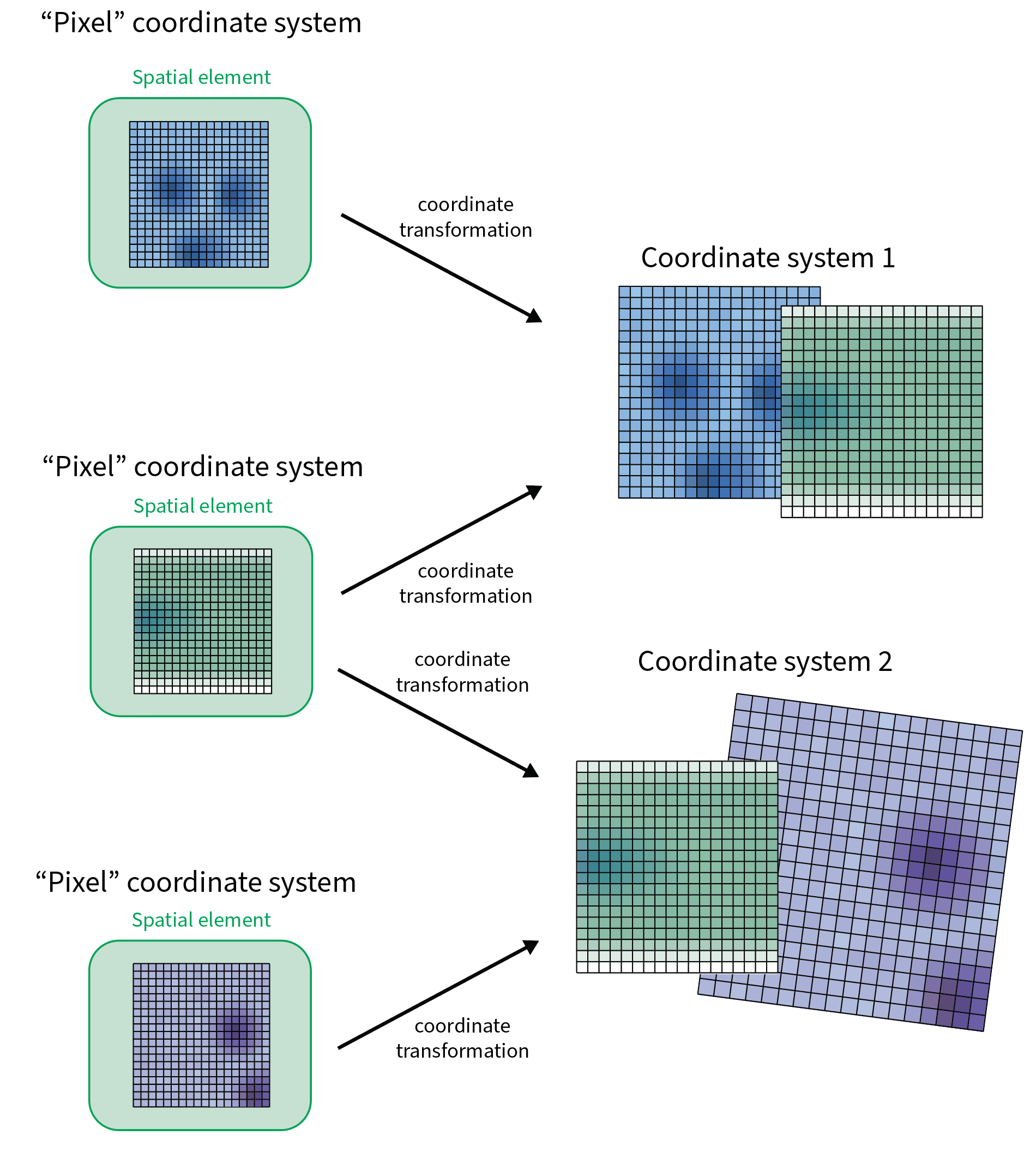
Each spatial element has its own intrinsic coordinate system and is mapped into one or more named coordinate systems by coordinate transformations.#
Transformations include identity, axis mapping, translation, scaling, affine transformations, and their composition. They operate on named axes, independently of the order in which those axes are represented.
Transformations directly associate spatial elements with named coordinate systems, rather than relating pairs of spatial elements or named coordinate systems.[16]Outlook: with NGFF 0.6 support, transformations will relate named coordinate systems to each other, and an element may have more than one path into a coordinate system. Further transformations may be derived through composition and inversion where possible.
Coordinate transformations describe spatial relationships without modifying the underlying data. Applying transformations to raster or vector data is a separate operation.
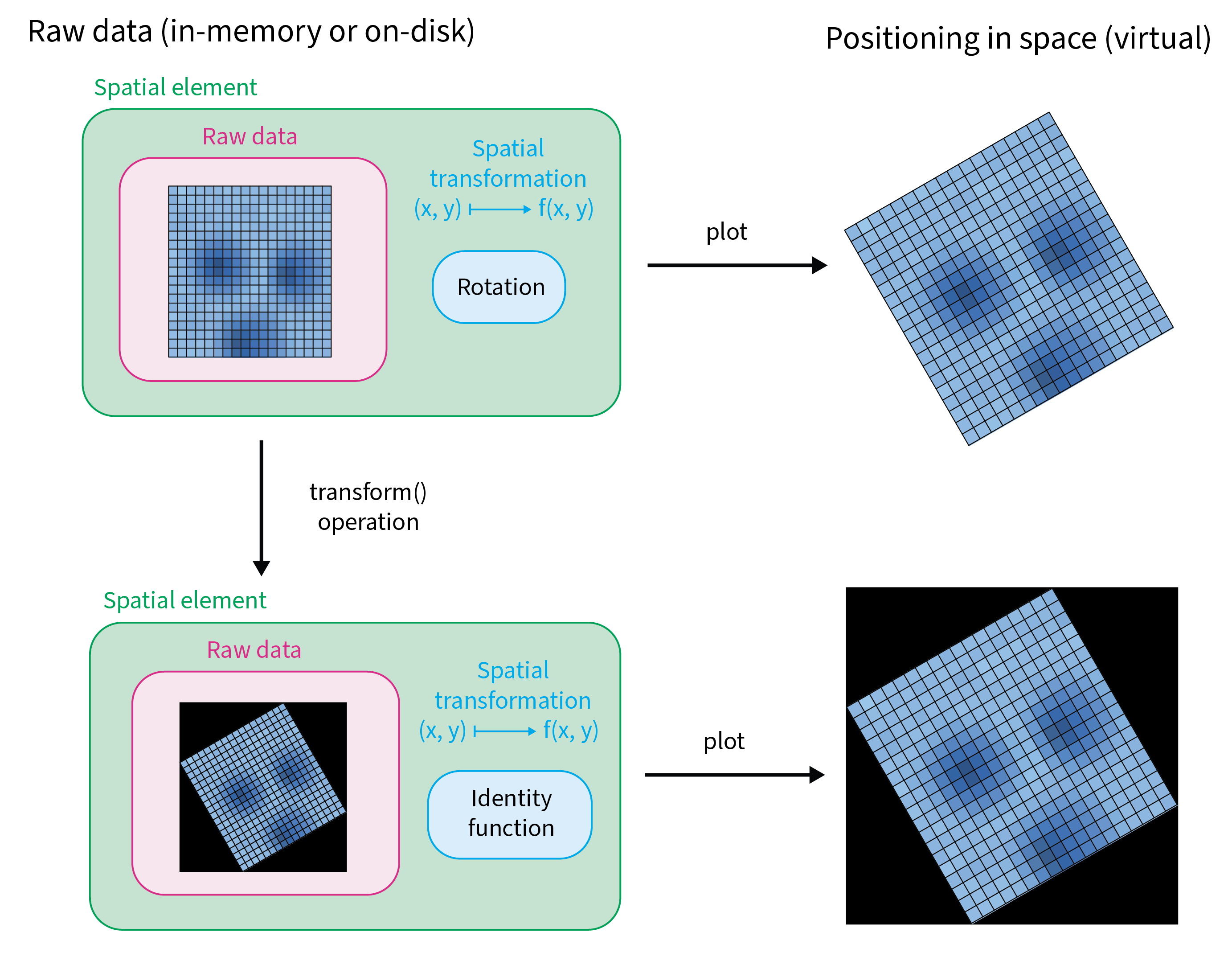
A transformation places the raw data in space without changing it (top). Applying the transformation rewrites the data (bottom); both are positioned identically. The figure simplifies: the transformation that remains is shown as the identity, but a resampled raster generally keeps a translation that places it.#
Sharing a coordinate system does not imply spatial overlap or biological correspondence between elements. Elements without a shared coordinate system have no defined spatial relationship unless one can be established through a chain of transformations.
Tables have no spatial coordinate systems or coordinate transformations of their own.
The intrinsic coordinate system of a stored element is:
Shapes and points: the space of the stored coordinates, in their own units.
Images and labels: the space of pixel indices of scale 0 (the highest resolution). Every scale maps into it through the scale of its level in the
multiscalesmetadata; per-level translations carry no meaning (Images).
The intrinsic coordinate system is never named, on disk or in memory.
In the example below, three elements share the named coordinate system "global", and
my_points also maps into "micron":
                        intrinsic (never shared)             named (shared)
   my_image  cyx ──identity────────────────────────▶ "global"
   my_labels yx  ──scale [0.5, 0.5]────────────────▶ "global"
   my_points xy  ──sequence [scale, translation]───▶ "global"
   my_points xy  ──scale [0.2, 0.2]────────────────▶ "micron"
Encoding#
Warning
Divergence from NGFF. SpatialData was created when NGFF 0.4 was current, and it needed
coordinate systems and transformations, which were being specified in NGFF RFC-5. RFC-5 was
expected to be part of the next NGFF release, so SpatialData built on a draft of it. This storage format
follows NGFF 0.4 with the draft encoding of transformations, but marks raster elements with the
version string "0.4" of the released NGFF.
Compared with NGFF:
NGFF 0.4 allows only
scaleandtranslation, only on raster data, and references no named coordinate systems;compared with RFC-5, as released in NGFF 0.6,
inputandoutputare inlined coordinate system objects instead of names referencing acoordinateSystemslist, and the same encoding is applied to shapes and points.
Implementation note
Because the encoding diverges from NGFF, generic OME-Zarr libraries cannot read these transformations. In practice, an implementation can:
rely on
spatialdata(Python) to read and write them;outside Python, validate against the JSON schemas listed in Examples and validation, where they exist for this version.
Transformations are stored as a JSON list named coordinateTransformations. Each entry maps the
element’s intrinsic coordinate system to one named coordinate system:
{
  "type": "scale",
  "scale": [1.0, 0.5, 0.5],
  "input": {
    "name": "zyx",
    "axes": [
      { "name": "z", "type": "space", "unit": "unit" },
      { "name": "y", "type": "space", "unit": "unit" },
      { "name": "x", "type": "space", "unit": "unit" }
    ]
  },
  "output": {
    "name": "global",
    "axes": [
      { "name": "z", "type": "space", "unit": "unit" },
      { "name": "y", "type": "space", "unit": "unit" },
      { "name": "x", "type": "space", "unit": "unit" }
    ]
  }
}
typeMUST be one of the types below.
inputMUST be a coordinate system object describing the element’s own axes, in storage order. Its
namecarries no meaning (writers use the concatenated axis names, e.g."cyx"); readers MUST NOT rely on it.outputMUST be a coordinate system object. Its
nameis the name of the target coordinate system. Itsaxeslist the output axes in the order produced by the transformation.
A coordinate system object has a name (string) and axes (list). Each axis has name, type and,
for space axes, unit:
{
  "name": "global",
  "axes": [
    { "name": "z", "type": "space", "unit": "unit" },
    { "name": "y", "type": "space", "unit": "unit" },
    { "name": "x", "type": "space", "unit": "unit" }
  ]
}
Writers that do not know the physical unit MUST write the placeholder
string "unit"; readers MUST accept any string here. In this version, units are informational:
readers MUST place elements without them, and nothing requires elements in one coordinate
system to declare the same unit.
An element belongs to a named coordinate system through output.name alone; the rest of the
output object is not compared between elements. The spatial axes x, y, z match by name
across elements, while c is local to each element. For example, an image (c, y, x), a labels
element (y, x) and a points element (x, y) can all map into "global", and their y and x
coordinates are then comparable.
Implementation note
In memory, the Python spatialdata framework does not use coordinate system objects: it keeps only
the output.name of each transformation, which is sufficient for this storage format.
Within one coordinateTransformations list, output.name values MUST be unique, since an
element has at most one transformation to each named coordinate system. [17]The JSON schemas of SpatialData.validate do not check this. spatialdata writes unique
names by construction (it keeps transformations in a mapping keyed by coordinate system name)
and, when reading a list with a repeated name, keeps the last entry. The list MUST contain at least one entry. When no
alignment information exists, writers SHOULD map the element to "global" with an identity
transformation. Coordinate system names follow the same rules as element names
(Element groups and names).
The list is stored in the element group:
Element |
Location |
|---|---|
images, labels |
|
shapes, points |
group attribute |
Raster elements additionally carry the NGFF per-level transformations in
multiscales[0].datasets[i].coordinateTransformations (a scale per pyramid level, relative to
level 0). To place a pixel of level i into a named coordinate system, a reader MUST apply the
level’s scale first, then the SpatialData transformation. See Images.
Transformation types#
All arrays and matrices are ordered like the input.axes (and output.axes) they refer to, and
MUST cover every input axis of the element. Axes that a transformation does not affect (typically
c) are written explicitly with a neutral value (1.0 for scale, 0.0 for translation).
Each transformation maps a point p with coordinates on its input axes to a point q with
coordinates on its output axes. p[a] is the coordinate of p on the axis named a:
Type |
Definition |
|---|---|
|
|
|
|
|
|
|
|
|
|
|
|
Scale factors and affine matrices are not restricted: a negative factor mirrors an axis, and a zero
factor or a singular matrix is valid but has no inverse; readers MAY fail on operations that need
the inverse. The c entries SHOULD be neutral: scale 1, translation 0, identity row and column
in affine, c mapped to c. Readers MAY ignore the c entries of a transformation.
Implementation note
spatialdata accepts zero and negative scale factors and singular affine matrices when setting,
writing and reading transformations; get_extent and transforming points work with them.
spatialdata.transform of a raster element uses the inverse and fails for a zero scale factor or a
singular matrix. spatialdata does not check how a transformation treats c: points have no c,
get_extent ignores it, and spatialdata.transform of an image resamples the array along c too,
so a transformation whose c entries are not neutral mixes or shifts channels.
No additional fields. Output axes equal input axes.
{
  "type": "identity",
  "input": {
    "name": "cyx",
    "axes": [
      { "name": "c", "type": "channel" },
      { "name": "y", "type": "space", "unit": "unit" },
      { "name": "x", "type": "space", "unit": "unit" }
    ]
  },
  "output": {
    "name": "global",
    "axes": [
      { "name": "c", "type": "channel" },
      { "name": "y", "type": "space", "unit": "unit" },
      { "name": "x", "type": "space", "unit": "unit" }
    ]
  }
}
scale: list of numbers, one per input axis. Output axes equal input axes.
{
  "type": "scale",
  "scale": [1.0, 0.5, 2.0],
  "input": {
    "name": "cyx",
    "axes": [
      { "name": "c", "type": "channel" },
      { "name": "y", "type": "space", "unit": "unit" },
      { "name": "x", "type": "space", "unit": "unit" }
    ]
  },
  "output": {
    "name": "global",
    "axes": [
      { "name": "c", "type": "channel" },
      { "name": "y", "type": "space", "unit": "unit" },
      { "name": "x", "type": "space", "unit": "unit" }
    ]
  }
}
translation: list of numbers, one per input axis. Output axes equal input axes.
{
  "type": "translation",
  "translation": [0.0, 10.0, -3.0],
  "input": {
    "name": "cyx",
    "axes": [
      { "name": "c", "type": "channel" },
      { "name": "y", "type": "space", "unit": "unit" },
      { "name": "x", "type": "space", "unit": "unit" }
    ]
  },
  "output": {
    "name": "global",
    "axes": [
      { "name": "c", "type": "channel" },
      { "name": "y", "type": "space", "unit": "unit" },
      { "name": "x", "type": "space", "unit": "unit" }
    ]
  }
}
affine: matrix with one row per output axis and one column per input axis plus a final column for
the translation. The homogeneous row [0, ..., 0, 1] is omitted. Output axes MAY differ in
order from input axes; the row order follows output.axes.
{
  "type": "affine",
  "affine": [
    [1.0, 0.0, 0.0, 0.0],
    [0.0, 0.0, 1.0, 5.0],
    [0.0, 2.0, 0.0, 6.0]
  ],
  "input": {
    "name": "cyx",
    "axes": [
      { "name": "c", "type": "channel" },
      { "name": "y", "type": "space", "unit": "unit" },
      { "name": "x", "type": "space", "unit": "unit" }
    ]
  },
  "output": {
    "name": "global",
    "axes": [
      { "name": "c", "type": "channel" },
      { "name": "x", "type": "space", "unit": "unit" },
      { "name": "y", "type": "space", "unit": "unit" }
    ]
  }
}
The example maps (c, y, x) ↦ (c, x + 5, 2·y + 6).
mapAxis: object whose keys are output axis names and values are input axis names; output axis
k takes the coordinate of input axis mapAxis[k]. An output axis that is not a key takes the
input axis of the same name.[18]spatialdata writes the keys it was given, so its stores may omit unchanged axes
such as c. When reading, it derives the output axes from the mapping and does not check them
against output.axes. The stricter check of its NgffMapAxis class (keys equal to the output
axes) does not run on read. Keys MUST be distinct, and keys and values MUST be
axes of the element. Each input axis SHOULD be used by exactly one output axis, so that the mapping
is a permutation.
{
  "type": "mapAxis",
  "mapAxis": { "c": "c", "x": "y", "y": "x" },
  "input": {
    "name": "cyx",
    "axes": [
      { "name": "c", "type": "channel" },
      { "name": "y", "type": "space", "unit": "unit" },
      { "name": "x", "type": "space", "unit": "unit" }
    ]
  },
  "output": {
    "name": "global",
    "axes": [
      { "name": "c", "type": "channel" },
      { "name": "x", "type": "space", "unit": "unit" },
      { "name": "y", "type": "space", "unit": "unit" }
    ]
  }
}
transformations: list of transformations applied in order. Each inner entry has its own type,
fields, input and output; the inner input.name and output.name MUST be ignored by readers
and only the axes used. The output axes of entry i MUST equal the input axes of entry i+1.
{
  "type": "sequence",
  "transformations": [
    {
      "type": "scale",
      "scale": [1.0, 2.0, 2.0],
      "input": {
        "name": "cyx",
        "axes": [
          { "name": "c", "type": "channel" },
          { "name": "y", "type": "space", "unit": "unit" },
          { "name": "x", "type": "space", "unit": "unit" }
        ]
      },
      "output": {
        "name": "global",
        "axes": [
          { "name": "c", "type": "channel" },
          { "name": "y", "type": "space", "unit": "unit" },
          { "name": "x", "type": "space", "unit": "unit" }
        ]
      }
    },
    {
      "type": "translation",
      "translation": [0.0, 1.0, 1.0],
      "input": {
        "name": "cyx",
        "axes": [
          { "name": "c", "type": "channel" },
          { "name": "y", "type": "space", "unit": "unit" },
          { "name": "x", "type": "space", "unit": "unit" }
        ]
      },
      "output": {
        "name": "global",
        "axes": [
          { "name": "c", "type": "channel" },
          { "name": "y", "type": "space", "unit": "unit" },
          { "name": "x", "type": "space", "unit": "unit" }
        ]
      }
    }
  ],
  "input": {
    "name": "cyx",
    "axes": [
      { "name": "c", "type": "channel" },
      { "name": "y", "type": "space", "unit": "unit" },
      { "name": "x", "type": "space", "unit": "unit" }
    ]
  },
  "output": {
    "name": "global",
    "axes": [
      { "name": "c", "type": "channel" },
      { "name": "y", "type": "space", "unit": "unit" },
      { "name": "x", "type": "space", "unit": "unit" }
    ]
  }
}
No other transformation types are part of the storage format. In particular,
rotation, byDimension, inverseOf, bijection, coordinates and displacements, defined by
NGFF RFC-5, are not supported.[19]spatialdata fails to read an element that uses them, or skips the element with
on_bad_files="warn".
Implementation note
Every supported type can be reduced to a single affine matrix of shape (n_out + 1) × (n_in + 1).
A reader can convert each entry to that form on load and compose sequences by matrix
multiplication, which is what spatialdata does in BaseTransformation.to_affine_matrix. Circles
in shapes require care: a non-uniform scale or a shear turns a circle into an ellipse, which the
format cannot represent. In such cases spatialdata warns and scales the radius by the mean of the
moduli of the eigenvalues of the linear part; to transform such shapes exactly, approximate the
circles with polygons first (spatialdata.to_polygons).
Instances and identifiers#
Points, labels, and shapes can contain identifiable instances:
In labels, instances are identified by their nonzero integer values.
In shapes and points, each geometry or point has an identifier. Shape identifiers are unique within their element. Point identifiers may repeat; points can be annotated by a table only when their identifiers are unique within the element.[20]Points may carry a column naming the instance (for example a cell in a labels or shapes element) that each point was assigned to. This is a per-point value like any other.
Instance identifiers are local to their spatial element. An instance is therefore identified by the combination of its element name and instance identifier.
Different elements may represent the same biological objects, but matching identifiers or coordinates do not automatically establish correspondence.
Annotation tables#
Tables contain observations, variables, measurements, and associated annotations. They support observation-by-variable matrices, additional measurement layers, observation and variable metadata, and structured auxiliary data.
A table may annotate instances of points, labels, or shapes. In a table that annotates spatial elements, each observation references one spatial instance through two columns:
Element: The name of the spatial element being annotated.
Instance: The identifier of the instance within that element.
Together, these values identify the spatial instance referenced by an observation.
For example, the pixels with value 7 in a labels element cells form one instance. A table row
annotating it has element cells and instance 7. The row also has its own name (the row name of
the table), such as cell_7; it names the row, not the instance. A points element may record for each point the
cell it lies in, such as 7 in cells. That is a per-point value, not the point’s own identifier,
which is what a table annotating the points refers to.
A table may annotate multiple spatial elements, and a spatial element may be annotated by multiple tables. Within a table, each instance is referenced by at most one observation; spatial instances may have no corresponding observations.
Dangling references are valid. A table may refer to elements or instances that are not in the dataset, for example after subsetting or after deleting an element. Such references are ignored when the table is related to the dataset.
Tables may also exist without annotating any spatial elements.
Annotation relationships do not depend on coordinate systems or transformations.
tables 0.1 Zarr v2
A table element is an AnnData
object stored in tables/<name> using the AnnData on-disk format for Zarr. Observations are the
rows of obs; the element and instance columns of the data model are the
obs columns named by region_key and instance_key.
This section specifies only what SpatialData adds to AnnData. Encoding of X, obs, var,
layers, obsm, obsp, varm, varp, uns and raw is exactly as specified by AnnData and is
not repeated here. The encodings present in a store follow the anndata release that wrote it
(for example, string indices are nullable-string-array groups since anndata 0.13 and were
string-array arrays before).
Readers MUST support the encodings of the AnnData specification version they claim.
Layout#
tables/<name>/
├── .zattrs            anndata encoding + region, region_key, instance_key, version
├── X/  obs/  var/  layers/  obsm/  obsp/  varm/  varp/  raw/     (AnnData)
└── uns/
    └── spatialdata_attrs/      region, region_key, instance_key   (copy, see below)
Some stores of this version hold a single table in the group table/table instead of
tables/<name>.[21]spatialdata up to 0.0.16 writes a single table in table/table. Readers SHOULD read it as a table named table.
Attributes#
The group attributes are the AnnData ones plus five SpatialData keys at the same level:
In tables/<name>/.zattrs:
{
  "encoding-type": "anndata",
  "encoding-version": "0.1.0",
  "spatialdata-encoding-type": "ngff:regions_table",
  "region": ["cells_labels", "nuclei_shapes"],
  "region_key": "region",
  "instance_key": "instance_id",
  "version": "0.1"
}
spatialdata-encoding-typeMUST be
"ngff:regions_table".versionMUST be
"0.1". Note that, unlike other element types, the version is a top-level attribute and not nested underspatialdata_attrs.regionA string, a list of strings, or
null. The name(s) of the elements this table annotates. Each name SHOULD be a labels, shapes or points element in the same store. Readers MUST NOT reject a table whoseregionnames an absent element, and MAY warn.region_keyA string or
null. Name of theobscolumn that states, for each row, which element inregionit annotates.instance_keyA string or
null. Name of theobscolumn that holds the instance identifier within that element.
region, region_key and instance_key MUST either all be null (a table that annotates
nothing) or all be non-null.
The same three keys are also stored inside the table as the AnnData uns["spatialdata_attrs"]
mapping (region, region_key, instance_key), because AnnData serialises uns as-is and in-memory
implementations keep them there.[22]spatialdata keeps the three keys in uns["spatialdata_attrs"] of the in-memory
AnnData object, and reads them from there, not from the group attributes. It writes no copy for
a table that annotates nothing. The copy MUST be present when the table annotates
elements, and MAY be absent otherwise; when present, it MUST equal the group attributes. Readers MAY
use either; implementations that do not parse uns SHOULD use the group attributes.
Annotation rules#
When the table annotates elements:
obs[region_key]MUST be a categorical column without missing values. The set of values that occur in it MUST equalregion; categories that no row uses are ignored. So every element named inregionhas at least one row, and a table without rows cannot name elements inregion(it setsregionto[]).obs[instance_key]MUST NOT contain nulls. For labels elements the values are the integer label values; for shapes and points they are the row index values of the payload, with matching type. The column has one type, so a table that annotates labels can annotate shapes or points only if their identifiers are integers.Each pair
(obs[region_key], obs[instance_key])MUST be unique: each instance is referenced by at most one row.Readers SHOULD match rows to instances by identifier, and tolerate instances without a row and dangling references.
Tables MUST NOT carry coordinate transformations.
tables/cells                          labels/cells_labels   shapes/nuclei_shapes
obs.region      obs.instance_id       (pixel values)        (row index)
cells_labels    1        ──────────▶  1
cells_labels    2        ──────────▶  2
nuclei_shapes   7        ────────────────────────────────▶  7
Naming#
obs and var column names and the keys of obsm, obsp, varm, varp, uns and layers
MUST follow the element naming rules of
Element groups and names. _index is reserved
by AnnData and MUST NOT be used as a column name. Uniqueness applies within each of these
separately: an obs column and a var column MAY have the same name, but two obs columns MUST
NOT differ only in case.
Implementation note
AnnData readers exist for Python, R (anndataR, zellkonverter), Julia (Muon.jl) and
JavaScript (vitessce’s zarr loaders). Read the table with one of those, then read the five
attributes above from the group. The spatialdata default column names written by spatialdata-io
are region for region_key and instance_id for instance_key; these are conventions, not
requirements.
Divergence from NGFF
NGFF has no table type. SpatialData tables follow the spirit of the (unmerged) NGFF tables proposal, whose
ngff:regions_table marker and region/region_key/instance_key fields it reuses.